fixtSE
FixtSEFixtSE
en Englishes Espanol
Blog
Membresia
Tienda
Scribe
Acerca de
en Englishes Espanol
Blog
Membresia
Tienda
Scribe
Acerca de

Youtube
Instagram
RSS
Github
Membresia
Privacidad
Fixt•
Publicado: Jul 30, 2023—4 min read

Mi primera tarjeta de Home Assistant 🎉: O365 Card 🗒️

Escrito por: Fixt

Si estas suscrito al canal
inicia sesion con tu cuenta de Google para acceder a la experiencia de tutorial inteligente.

Tabla de contenidos
InstalaciónAgregar más funcionalidadCrear nueva tarea desde el panelNueva tarjeta de tarea para el panelAutomatización para responder el último mensaje de TeamsTarjeta del panel para responder el último mensaje de Teams

Destacados

Relacionados

Etiquetas

Microsoft-365
Home-Assistant
Panel
Automatización

Si te gusta mi trabajo, considera apoyarme en Ko-fi.

← Volver al blog

Instalación
#

Configuración de O365 Card

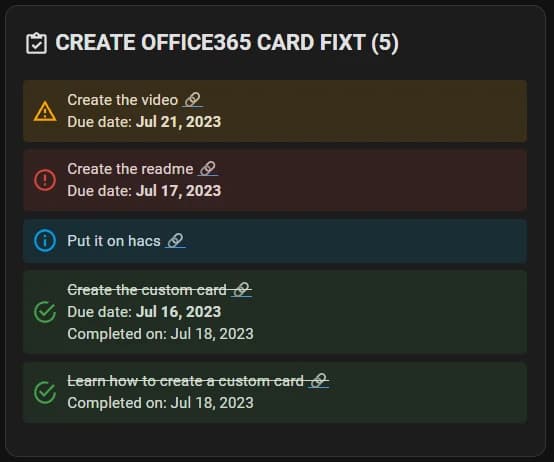
Esta es una tarjeta personalizada para mostrar información de tus sensores O365 en el panel de Home Assistant.
La intención es crear una tarjeta simple y fácil de usar para mostrar la información del sensor en el panel.

Una vez instalada, se puede agregar desde el panel de Dashboard; solo busca O365 Card. Funciona con el editor de configuración de Lovelace.
Tipos compatibles

Mail
To Do
Teams

Agregar más funcionalidad
#

Open your Home Assistant instance and show your helper entities.
Puedes usar este botón para ir a la página de ayudantes. Allí crea un nuevo input_text (Texto) y ponle el nombre que quieras.

Crear nueva tarea desde el panel
#

To Do

Etiquetas

Microsoft-365
Home-Assistant
Panel
Automatización
← Volver al blog

Destacados

Relacionados

Etiquetas

Microsoft-365
Home-Assistant
Panel
Automatización

config/automations.yaml

alias: Create new task office 365 list
description: ""
trigger:
  - platform: state
    entity_id:
      - input_text.o365_card_task_input #Change this to your input_text
condition:
  - condition: template
    value_template: '{{ (states.input_text.o365_card_task_input.state | length) > 0 }}' #Change this to your input_text
    enabled: true
action:
  - service: o365.new_task
    data:
      subject: '{{ states.input_text.o365_card_task_input.state }}' #Change this to your input_text
    target:
      entity_id: sensor.create_office365_card_fixt #Change this to your tasks sensor
  - service: input_text.set_value
    data:
      value: ''
    target:
      entity_id: input_text.o365_card_task_input #Change this to your input_text
  - service: homeassistant.update_entity
    data: {}
    target:
      entity_id: sensor.create_office365_card_fixt #Change this to your tasks sensor
mode: single

Nueva tarjeta de tarea para el panel
#

Custom Card

type: vertical-stack
cards:
  - type: custom:o365-card
    entity: sensor.create_office365_card_fixt #Change this to your tasks sensor
    max_items: 0
    only_overdue: false
  - type: entities
    entities:
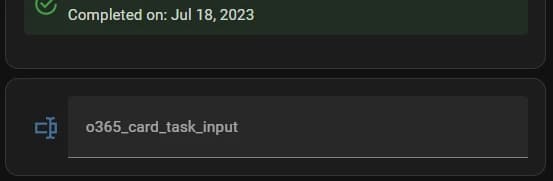
      - entity: input_text.o365_card_task_input #Change this to your input_text

Automatización para responder el último mensaje de Teams
#

Teams

config/automations.yaml

alias: Send Teams Chat Message
description: ""
trigger:
  - platform: state
    entity_id:
      - input_text.o365_card_chat_input #Change this to your input_text
condition:
  - condition: template
    value_template: '{{ (states.input_text.o365_card_chat_input.state | length) > 0 }}' #Change this to your input_text
    enabled: true
action:
  - service: o365.send_chat_message
    data:
      chat_id: '{{ states.sensor.fixt_chat.attributes.chat_id }}' #Change this to your chat sensor
      message: '{{ states.input_text.o365_card_chat_input.state }}' #Change this to your input_text
    target:
      entity_id: sensor.fixt_chat #Change this to your chat sensor
  - service: input_text.set_value
    data:
      value: ''
    target:
      entity_id: input_text.o365_card_chat_input #Change this to your input_text
mode: single

Tarjeta del panel para responder el último mensaje de Teams
#

Custom Card

type: vertical-stack
cards:
  - type: custom:o365-card
    entity: sensor.fixt_chat #Change this to your chat sensor
    max_items: 0
    only_overdue: false
  - type: entities
    entities:
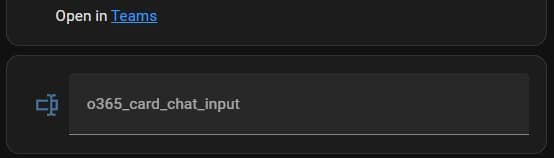
      - entity: input_text.o365_card_chat_input #Change this to your input_text
YouTube Subscriber Access
CARD

YouTube Subscriber Benefit

This card is free for all our YouTube subscribers!

Log in with your Google account to access it on our website.

Subscribe to our channel

💡 Validation Tip

If you have trouble with this feature, make sure your subscription list is public in your YouTube settings, under "Privacy".